Processing Payouts — How the flow works
In addition to payments Our platform provides a seamless way to process payouts to your users. With a single API call that includes type: 'payout', you can initiate payouts, collect recipient details through a secure hosted form, and receive real-time status updates via webhooks.
The term 'Payout' will be used further in the documentation - this is a regular Payment with the type 'payout'.
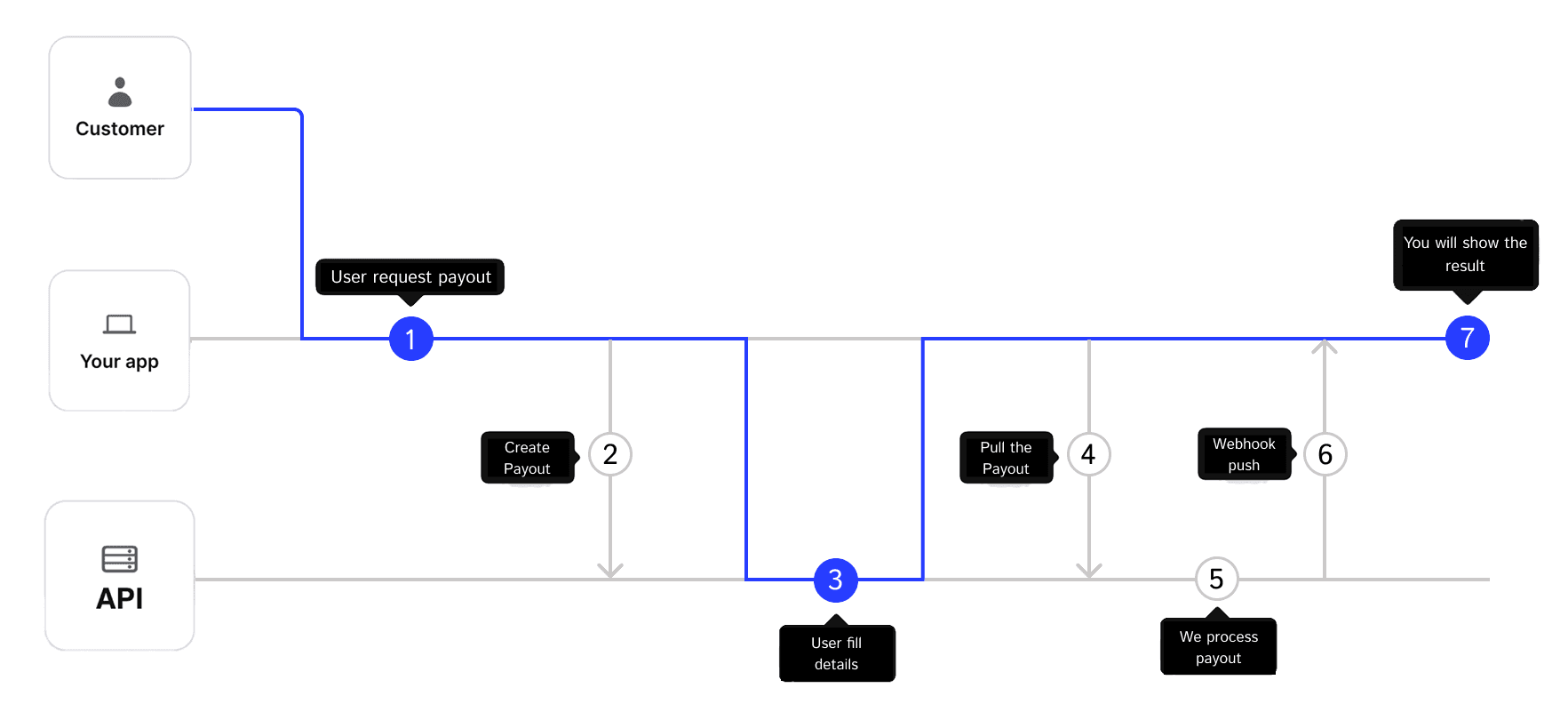 Figure 1 – Payout flow from initiation to completion.
- Payout initiated
The merchant initiates a payout from their system. - Create payout
Your back-end callsPOST /api/paymentswith the amount, currency, andtype: 'payout'to get the payout formurl. - Hosted Payout Form
You redirect the user to the Payout Form where they can securely enter their payout method details. - Return to your site
We redirect the user back to yourredirectUrl, carrying the payment ID so you can show the payout status. - Poll if you wish
You can retrieve the payment withGET /api/payments/:idto see whether it ispending,succeededorfailed. - Webhook push
As soon as the status becomes final, we POST a webhook to the URL you supplied, signed with the token for verification.
With just one API call (including the required type: 'payout' parameter) and one webhook, you have everything you need to process payouts, update your records, and provide a seamless experience to your users.
Payouts API
The Payouts API lets you send money to users in your web apps.
Preparation
- Get a token in the Merchant Dashboard, enable the “Payout” checkbox when generating the token. Keep this token on your server — never expose it in frontend code.
- Call every endpoint over HTTPS and add the header:
Authorization: Bearer <your-token> - ‼️ Always include
type: 'payout'when composing in your request body to indicate this is a payout transaction. By default, the payment type is'payin'. - (Optional) Add an Idempotency-Key header with a UUID v4 to prevent duplicate payouts if you need to retry the request.
Step 1 — Create a payout
Endpoint
POST /api/payments
Content-Type: application/json
Required body fields
| Field | Type | Example | Description |
|---|---|---|---|
amount | string, decimal | "10.00" | Use a dot as the decimal separator. |
currency | string, ISO 4217 | "EUR" | Three capital letters. |
type | string | "payout" | Must be set to "payout" to indicate this is a payout transaction. |
Optional body fields
| Field | Type | Purpose |
|---|---|---|
description | string, max 255 chars | Shown to the recipient and in your dashboard. |
metadata | object, max 4KB | Any JSON object (max 4KB when serialized). Arrays and null values are not allowed in the root. |
externalId | string, max 255 chars | Your unique identifier for this payment. Useful for mapping our payment ID to your internal ID. |
redirectUrl | URL, max 2KB | Where to return the user after filling in the payment details. Must be HTTPS |
webhookUrl | URL, max 2KB | Overrides the default webhook just for this payout. Must be HTTPS. |
cURL example
curl -X POST https://example.com/api/payments \
  -H "Authorization: Bearer tk_test_n4912345faza90aefk4c3awf" \
  -H "Idempotency-Key: 3e3f3796-4c3a-41e2-a90a-2c0f3e20b0a1" \
  -H "Content-Type: application/json" \
  -d '{
        "externalId": "3e3f3796-4c3a-41e2-a90a-2c0f3e20b0a1",
        "amount": "10.00",
        "currency": "EUR",
        "type": "payout",
        "description": "Order #1456",
        "customer": { "id": "550e8400-e29b-41d4-a716-446655440000", "name": "User Name" },
        "metadata": { "orderId": 1456 }
      }'
Response 201 Created / 200 OK
{
  "id": "pay_a1b2c3d4",
  "status": "pending",
  "url": "https://example.com/checkin/pay_a1b2c3d4",
  "externalId": "3e3f3796-4c3a-41e2-a90a-2c0f3e20b0a1",
  "amount": "10.00",
  "currency": "EUR",
  "description": "Order #1456",
  "metadata": { "orderId": 1456 },
  "createdAt": "2025-05-27T14:25:00Z"
}
Fields not echoed back: redirectUrl, customer, webhookUrl.
What next?
- Open
urlin the browser or WebView — the user sees the hosted checkin page. - After filling in the details, we redirect the user to your
redirectUrl(if you specified one). - We send a webhook with the final status (
succeeded/failed). - Repeat the same JSON with the same or no
Idempotency-Key: you’ll always get the same response, never a duplicate charge.
Payment Limits
Each payment method has minimum and maximum allowed amounts. These limits depend on the method and currency and should be respected when creating payments.
How to get limits
You can retrieve available payment methods and their limits using the following endpoint:
| Endpoint | Description |
|---|---|
GET /api/views?type=payout | Get payment methods and UI views (for payouts) |
The response contains several objects, including: views, methods, currencies.
To determine the allowed limits for payments, you should inspect the methods object.
Method fields
Each payment method contains the following limit fields:
minAmount— Minimum amount allowed for the payment methodmaxAmount— Maximum amount allowed for the payment method
Example structure:
{
  "methods": [
    {
      "name": "yape-pen-p2p",
      "currency": "PEN",
      "minAmount": 1000,
      "maxAmount": 500000
    }
  ]
}
You should configure these limits in your system to ensure that the payment amount is valid before creating the payment.
If the payment amount is outside the allowed range, the API will return a error.
Example when the amount is less than the minimum allowed:
{
  "details": "Errors.paymentAmountIsLessThanMinAmount",
  "errorId": "err_5efc05b6868e425dbdeb432617c7684d",
  "timestamp": "2026-03-11T05:52:47.802Z",
  "variables": {
    "minAmount": 1000,
    "currentAmount": 100
  }
}
In this case:
minAmount— minimum allowed amount for the selected payment methodcurrentAmount— the amount provided in the request
If the amount exceeds the allowed maximum, a similar validation error will be returned with the corresponding limit information.
Recommendation:
- Retrieve available payment methods using GET /api/views.
- Store minAmount and maxAmount for the methods you support.
- Validate the payment amount on your side before calling POST /api/payments.
Other sections
- Service - more information about service work
- Payform - more information about custom payment chechout page
- Payoutform - more information about custom payout checkin page