Build your own payment forms
You already know how to create a Payment and redirect shoppers to our hosted PayForm.
We provide a hosted checkout system out of the box. Your integration can be as simple as creating a payment request, sending your customer to our checkout, and letting us handle the rest.
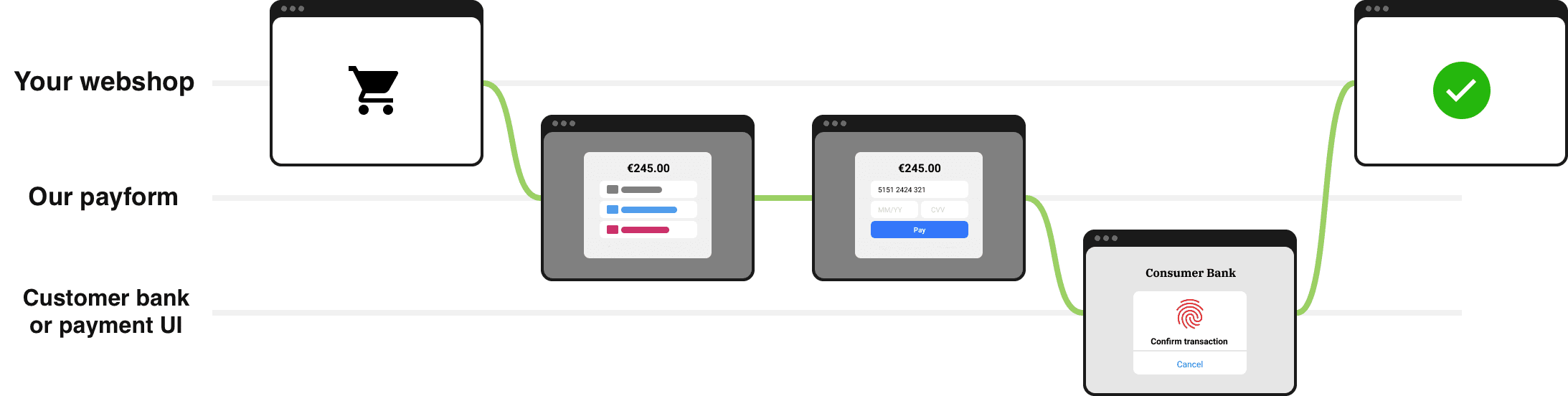 Figure 1 — The common checkout path with our PayForm.
Payment Flow Steps
- Your customer wants to check out.
- After setting up a payment with
POST /api/paymentsandtype: 'payin', you send your customer to our payment method selection screen. - Depending on the payment method, your customer may need to provide additional information.
- Depending on the payment method, the customer may need to authenticate the transaction with their bank or payment system.
- The customer completes the payment, you receive a webhook, and the customer is sent back to your website.
Building Custom Forms
Now you want to build a fully-custom UI that lives on your own page for either payments.
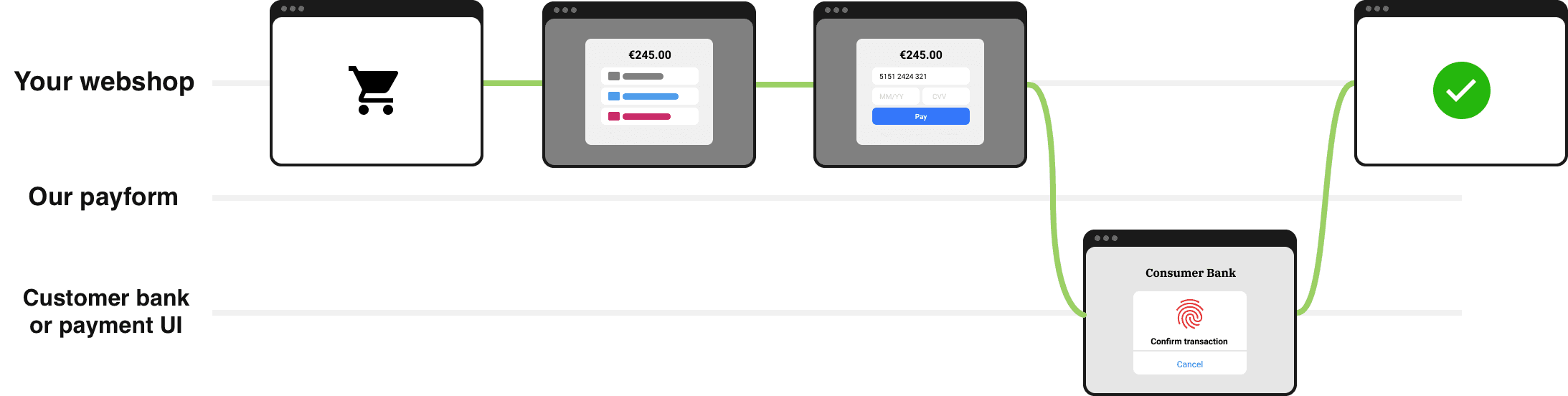 Figure 2 — Your own custom UI flow.
The flow for both payments uses the same endpoints:
| What you call | Purpose |
|---|---|
GET /api/views | For payments: Get all payment methods and UI views |
POST /api/payments/:id | Single action endpoint that drives the wizard for both flows. You always send the current state object, we answer with an updated Payment. |
Preparation
-
Get a token in the Merchant Dashboard.
- For payments: Use the standard token
⚠️ Important: Always keep tokens on your server — never expose them in frontend code.
-
Call every endpoint over HTTPS and add the header
Authorization: Bearer <your-token>for creting.
Step 1 — Discover payment methods and their UI views
Endpoints
| Endpoint | Description |
|---|---|
GET /api/views | Get payment methods and UI views (for payments) |
POST /api/payments/:id | Update payment state |
Response Format
Both payment endpoints return a response with two main sections:
Views
Each view has the following structure:
id: Unique identifier for the viewdescription: Detailed description of the view's purposepreviousViews: Array of view IDs that can navigate to this viewpreviousViewsFields: Fields to collect when navigating back to this viewnextViews: Array of view IDs that can be navigated to from this viewnextViewsFields: Fields to collect for navigating to the next view
Methods
Each method has:
method: Unique identifier for the method (e.g., "card", "yape-pen-p2p")displayName: User-friendly name (e.g., "Credit/Debit Card", "Yape PEN")displayDescription: Detailed descriptiondisplayNameTranslationKey: Translation key (if you use multilanguage)displayDescriptionTranslationKey: Translation key (if you use multilanguage)logoUrl: Path to the method's logominAmount: Minimum amount for the methodmaxAmount: Maximum amount for the methodsupportedCurrencies: Array of supported currency codesnextView: The first view to show when this method is selected
Response for /api/views
{
  "views": [
      {
      "id": "selectPaymentMethod",
      "description": "Select payment method",
      "previousViews": [],
      "previousViewsFields": [],
      "nextViews": ["selectPaymentMethod"],
      "nextViewsFields": [
        {
          "name": "method",
          "type": "select",
          "label": "Payment method",
          "required": true,
          "options": [{
            "value": <method name>, // e.g. "card"
            "label": <method display name> // e.g. "Credit / Debit card"
          }], // Array with all available payment methods
        },
      ],
    },
    {
      "id": "collectCardDetails",
      "description": "Collect card details",
      "previousViews": ["selectPaymentMethod"],
      "previousViewsFields": [
        {
          "name": "method",
          "type": "hidden",
          "label": "Payment method",
          "required": true,
          "options": [{ value: null, label: 'Clear method' }],
        },
      ],
      "nextViews": ["collectCardDetails"],
      "nextViewsFields": [
        {
          "name": "method",
          "type": "hidden",
          "label": "Payment method",
          "required": true,
          "options": [{ value: 'card', label: 'Credit / Debit card' }],
        },
        {
          "name": "cardHolder",
          "type": "text",
          "label": "Name on card",
          "required": true,
          "placeholder": "John Smith",
        },
        {
          "name": "cardNumber",
          "type": "card",
          "label": "Card number",
          "required": true,
          "placeholder": "4242 4242 4242 4242",
          "pattern": "^[0-9\\s]{13,19}$",
        },
        {
          "name": "cardExpMonth",
          "type": "month",
          "label": "MM",
          "required": true,
          "placeholder": "MM",
          "minLength": 1,
          "maxLength": 2,
        },
        {
          "name": "cardExpYear",
          "type": "year",
          "label": "YY",
          "required": true,
          "placeholder": "YY",
          "minLength": 2,
          "maxLength": 4,
        },
        {
          "name": "cardSecurityCode",
          "type": "password",
          "label": "CVC",
          "required": true,
          "placeholder": "CVC",
          "minLength": 3,
          "maxLength": 4,
        },
      ],
    },
    {
      "id": "collectP2PDetails",
      "description": "Collect fields for P2P transaction",
      "previousViews": ["selectPaymentMethod"],
      "previousViewsFields": [
        {
          "name": "method",
          "type": "hidden",
          "label": "Payment method",
          "required": true,
          "options": [{ value: null, label: 'Clear method' }],
        },
      ],
      "nextViews": ["collectP2PDetails"],
      "nextViewsFields": [
        {
          "name": "method",
          "type": "hidden",
          "label": "Payment method",
          "required": true,
          "options": [{
            "value": <method name>,
            "label": <method display name>
          }], // Array with all available P2P payment methods
        },
        {
          "name": "phone",
          "type": "phone",
          "label": "Payer phone number",
          "required": false,
          "placeholder": "+1 234 567 8900",
        },
        {
          "name": "card",
          "type": "card",
          "label": "Payer card number",
          "required": false,
          "placeholder": "4242 4242 4242 4242",
          "pattern": "^[0-9\\s]{13,19}$",
        },
        {
          "name": "name",
          "type": "text",
          "label": "Payer name",
          "required": false,
          "placeholder": "John Smith",
        },
        {
          "name": "account",
          "type": "text",
          "label": "Account number",
          "required": false,
          "placeholder": "1234567890",
        },
        {
          "name": "bank",
          "type": "text",
          "label": "Bank name",
          "required": false,
          "placeholder": "Bank name",
        },
      ],
    },
    {
      "id": "waitingForProcessing",
      "description": "Processing payment view. Wait until some async action is completed",
      "previousViews": ["selectPaymentMethod"],
      "previousViewsFields": [
        {
          "name": "method",
          "type": "hidden",
          "label": "Payment method",
          "required": true,
          "options": [{ value: null, label: 'Clear method' }],
        },
      ],
      "nextViews": ["waitingForProcessing"],
      "nextViewsFields": [
        {
          "name": "method",
          "type": "hidden",
          "label": "Payment method",
          "required": true,
          "options": [{ value: 'card', label: 'Credit / Debit card' }],
        },
        {
          "name": "confirmationToken",
          "type": "hidden",
          "label": "Confirmation token (if status is succeeded)",
          "required": true,
          "placeholder": "Pnf4ws0aa3FuAxX1xo092...",
        },
        {
          "name": "status",
          "type": "hidden",
          "label": "Final status",
          "required": true,
          "placeholder": "succeeded",
        },
        {
          "name": "amount",
          "type": "hidden",
          "label": "Amount",
          "required": true,
          "placeholder": "100",
        },
        {
          "name": "currency",
          "type": "hidden",
          "label": "Currency",
          "required": true,
          "placeholder": "USD",
        },
        {
          "name": "reason",
          "type": "hidden",
          "label": "Final status reason",
          "required": false,
          "placeholder": "Why the payment failed",
        },
      ],
    },
    {
      "id": "waitingForP2PTransactionAndConfirmation",
      "description": "Show payment details and wait for payer P2P transaction and P2P approval",
      "previousViews": ["selectPaymentMethod"],
      "previousViewsFields": [
        {
          "name": "method",
          "type": "hidden",
          "label": "Payment method",
          "required": true,
          "options": [{ value: null, label: 'Clear method' }],
        },
      ],
      "nextViews": ["waitingForP2PTransactionAndConfirmation"],
      "nextViewsFields": [
        {
          "name": "method",
          "type": "hidden",
          "label": "Payment method",
          "required": true,
          "options": [{
            "value": <method name>,
            "label": <method display name>
          }], // Array with all available P2P payment methods
        },
        {
          "name": "isPayeerApproved",
          "type": "checkbox",
          "label": "Payer approved the transaction",
          "required": false,
          "defaultValue": false,
        },
        {
          "name": "confirmationToken",
          "type": "hidden",
          "label": "Confirmation token (if status is succeeded)",
          "required": false,
          "placeholder": "Pnf4ws0aa3FuAxX1xo092...",
        },
        {
          "name": "amount",
          "type": "hidden",
          "label": "Amount",
          "required": false,
          "placeholder": "100",
        },
        {
          "name": "currency",
          "type": "hidden",
          "label": "Currency",
          "required": false,
          "placeholder": "USD",
        },
        {
          "name": "status",
          "type": "hidden",
          "label": "Final status",
          "required": false,
          "placeholder": "failed",
        },
        {
          "name": "reason",
          "type": "hidden",
          "label": "Final status reason",
          "required": false,
          "placeholder": "User canceled the payment",
        },
      ],
    },
    {
      "id": "confirmed",
      "description": "Congratulations! Your payment has been confirmed",
      "previousViews": [],
      "previousViewsFields": [],
      "nextViews": [],
      "nextViewsFields": [],
    },
    {
      "id": "canceled",
      "description": "Your payment has been canceled",
      "previousViews": [],
      "previousViewsFields": [],
      "nextViews": [],
      "nextViewsFields": [],
    },
  ],
  "methods": [
    {
      "method": "card-usd-p2p",
      "displayName": "Card to card",
      "displayDescription": "Pay with card to card",
      "displayNameTranslationKey": "PaymentMethod.card-usd-p2p.displayName"
      "displayDescriptionTranslationKey": "PaymentMethod.card-usd-p2p.displayDescription"
      "logoUrl": "/methods/card-logo.svg",
      "minAmount": "10",
      "maxAmount": "1000",
      "supportedCurrencies": ["USD"],
      "nextView": "collectP2PDetails"
    },
    ...
  ] // Array of information about all active payment methods
}
Cache this response — it changes rarely (new methods).
Step 2 — Update UI state
This API lets you move through the payment process step by step. Think of it as navigating through a series of screens - each step collects specific information needed to complete the payment.
When created, a Payment object starts in the default state: { "view": "selectPaymentMethod", "method": null }.
This shows the payment method selection screen to the user.
Important!
The payment's state object has several views:
'selectPaymentMethod',
'collectCardDetails',
'collectP2PDetails',
'waitingForP2PTransactionAndConfirmation',
'waitingForProcessing',
'confirmed',
'canceled',
You need to prepare interfaces on your chechkot page for each of them.
The snippet below shows the full back-and-forth between your front-end and /api/payments/:id.
Lines starting with → are your POST updates, those with GET are your status checks, and ← is what the server returns.
Updating Payment State
A complete end-to-end example (using card-usd-p2p).
# Payment has just been created
GET /api/payments/pay_466169…
← 200 OK
{
  "state": {
    "view":   "selectPaymentMethod",
    "method": null
  },
  "status":  "pending",
  "currency":"USD",
  "amount":  "150"
}

# 1. Shopper chooses "P2P card"
POST /api/payments/pay_466169…
→ { "state": { "view":"selectPaymentMethod", "method": "card-usd-p2p" } }  // "view" should ALWAYS present

← 200 OK
{
  "state": {
    "view":   "collectP2PDetails",
    "isP2P": true,
    "method": "card-usd-p2p"
  },
  …
}

# 2. Shopper types the card data your UI asks for

POST /api/payments/pay_466169…
→ {
  "state": {
    "view": "collectP2PDetails",
    "method": "card-usd-p2p",
    "card": "4111111111111111",
    "name": "JHON TEST"
  }
}

← 200 OK
{
  "state": {
    "card": "4111111111111111",
    "name": "JHON TEST",
    "view": "waitingForP2PTransactionAndConfirmation",
    "isP2P": true,
    "method": "card-usd-p2p",
    "p2pRecipientCard": "5555555555554444",
    "p2pRecipientName": "JHON DOE"
  },
  …
}

# 3. After this, the payment will be processed by the organization, which will verify it. /n
You need to poll until the payment leaves the “pending” state
GET /api/payments/pay_466169…
← 200 OK
{
  "state": {
    "card": "4111 1111 1111 1111",
    "name": "JHON TEST",
    "view": "confirmed",
    "isP2P": true,
    "method": "card-usd-p2p",
    "reason": "Payment succeeded",
    "oldAmount": "150",
    "oldStatus": "pending",
    "oldCurrency": "USD",
    "redirectUrl": <redirect_url>,
    "isPayeerApproved": true,
    "p2pRecipientCard": "5555555555554444",
    "p2pRecipientName": "JHON DOE",
    "payeerApprovedCounter": 1
  },
  "status":"succeeded",
  "currency":"USD",  // can be different from the initial currency
  "amount":"150"     // can be different from the initial amount
}

# 4. …or handle a failure path
GET /api/payments/pay_466169…
← 200 OK
{
  "state": {
    "card": "4111 1111 1111 1111",
    "name": "JHON TEST",
    "view": "canceled",
    "isP2P": true,
    "method": "card-usd-p2p",
    "reason": "Payment rejected",
    "oldAmount": "150",
    "oldStatus": "pending",
    "oldCurrency": "USD",
    "p2pRecipientCard": "5555555555554444",
    "p2pRecipientName": "JHON DOE"
  },
  "status":"failed",
  "currency":"USD",  // can be different from the initial currency
  "amount":"150"       // can be different from the initial amount
}
Key take-aways:
- The server always tells you the next
view. Your UI simply renders what it’s told.
Endpoint
POST /api/payments/:id
Content-Type: application/json
Authorization: Bearer <your-token>
Request body
You always send the state update object with the required fields for the current view:
{
  "state": {
    "view": "collectP2PDetails",
    "method": "card-usd-p2p",
    "card": "4111111111111111",
    "name": "JHON TEST"
  }
}
- The very first call only contains
"method": "<chosen-method>"and"view": "selectPaymentMethod". - Extra keys are ignored; missing required keys return HTTP 400.
Response 200 OK
{
  "id": "pay_a1b2c3",
  "status": "pending",
  "state": {
    "card": "4111111111111111",
    "name": "JHON TEST",
    "view": "waitingForP2PTransactionAndConfirmation",
    "isP2P": true,
    "method": "card-usd-p2p",
    "p2pRecipientCard": "5555555555554444",
    "p2pRecipientName": "JHON DOE"
  },
  ...
}
Overrides the default state
You can manually set the initial state of a payment. This can be useful in two situations:
-
Preselecting a payment method. If you already know which payment method should be used, you can set the required state immediately, skipping the standard method-selection flow.
-
Creating without user interaction. The recipient details have already been collected. The client requests the payment instructions (where the funds should be sent).
Below is a detailed explanation of each scenario.
Creating a payment without user interaction
⚠️ Important: The state object supports the following fields: method, name, phone, account, bank, card. You should provide only the fields required by the selected payment method.
Then provide a state object, for example for yape-pen-p2p:
{
  "state": {
    "method": "yape-pen-p2p",
    "name": "JOHN TEST",
    "phone": "+573001112233"
  }
}
In the method field, you should pass the internal name of the payment method, for example card-usd-p2p, yape-pen-p2p, etc.
Full request example:
curl -X POST 'https://example.com/api/payments' \
  -H "Authorization: Bearer tk_test_n4912345faza90aefk4c3awf" \
  -H "Content-Type: application/json" \
  -d '{
      "amount": "10",
      "currency": "PEN",
      "type": "payin",
      "state": {
        "method": "yape-pen-p2p",
        "name": "JOHN TEST"
      }
    }'
If all validations are successful, the method is active, and the provided details are valid, you will receive a response like this:
{
  "id": "pay_4dc6dec2-1684-41dd-b99e-d330200e132b",
  "externalId": null,
  "amount": "10",
  "currency": "PEN",
  "status": "pending",
  "state": {
    "name": "JOHN TEST",
    "view": "waitingForP2PTransactionAndConfirmation",
    "isP2P": true,
    "method": "yape-pen-p2p"
  },
  "formOptions": {
    "lang": "es",
    "methods": [
      "nequi-p2p",
      "transfiya-p2p",
      "daviplata-p2p",
      "nequi-bre-b-p2p",
      "qr-pen-p2p",
      "plin-p2p",
      "viabcp-p2p",
      "interbank-p2p",
      "bank2bank-pe-p2p",
      "yape-pen-p2p",
      "yape-bob-p2p",
      "qr-bob-p2p",
      "card-usd-p2p",
      "phone2phone-usd-p2p"
    ],
    "navigation": false,
  },
  "type": "payin",
  "url": "http://example.com/checkout/pay_4dc6dec2-1684-41dd-b99e-d330200e132b?lang=es&methods=nequi-p2p%2Ctransfiya-p2p%2Cdaviplata-p2p%2Cplin-p2p%2Cviabcp-p2p%2Cinterbank-p2p%2Cbank2bank-pe-p2p%2Cyape-pen-p2p%2Cyape-bob-p2p%2Cqr-bob-p2p%2Ccard-usd-p2p%2Cphone2phone-usd-p2p&navigation=false",
  "description": "",
  "metadata": null
}
⚠️ NOTE: Unlike the next scenario, if any validation fails in this flow, the payin will not be created at all.
Preselecting a payment method
When creating a payin, you have the option to pass a state object like this:
{
  "state": {
    "view": "selectPaymentMethod",
    "method": "yape-pen-p2p"
  }
}
In the method field, you should pass the internal name of the payment method, for example card-usd-p2p, yape-pen-p2p, etc.
The view field must always be set to "view": "selectPaymentMethod".
In this case, the user will immediately see the form for entering the transfer details.
⚠️ Important: if the specified payment method is not supported by your organization, is invalid, does not support the payment currency, or the staff organizations do not have payment details for it, the payin will be created with the default state:
{
  "state": {
    "view": "selectPaymentMethod",
    "method": null
  }
}
Additionally, you can pass formOptions for the payment so that on the payment method selection step, the user only sees and can choose the methods you want. Example of a valid full JSON request body:
{
  "amount": "10",
  "currency": "PEN",
  "type": "payin",
  "description": "Test Payment",
  "state": {
    "view": "selectPaymentMethod",
    "method": "yape-pen-p2p"
  },
  "formOptions": {
    "navigation": false,
    "methods": ["yape-pen-p2p"],
    "lang": "es"
  }
}
Masking & redaction rules
| Field you sent | What we return | Reason |
|---|---|---|
cardNumber | 411111********11 | PCI DSS PAN masking |
cardSecurityCode | never returned | CVV must not be stored |
Never display the masked values back to the shopper—they just typed them.
Error responses
| HTTP | type | When it happens | Example details |
|---|---|---|---|
| 400 | validation_error | Missing/invalid field from state.fields | cardNumber must be Luhn-valid |
| 400 | invalid_transition | Not allowed from current step | cannot choose method, step=processing |
| 401 | unauthorized | No / wrong / expired token | invalid token |
| 429 | rate_limit | Too many requests | retry in 3 s |
| 500 | internal | Unexpected server error | – |
All errors share this JSON envelope: bn
{
  "type": "validation_error",
  "details": "Errors.validation.card.number.required",
  "errorId": "a3c8b6f9-e5cb-4d93-9f40-1a9ceca565d6",
  "timestamp": "2025-05-27T14:32:55Z",
  "fieldErrors": {
    "cardNumber": ["Errors.validation.card.number.required"]
  }
}
Use errorId when contacting support.
Security checklist
| ✔ | What to do |
|---|---|
| ✅ | Serve your own checkout over HTTPS (TLS 1.2+). |
| ✅ | Verify the HMAC signature on every webhook. |
| ✅ | Store only the masked data we return. |
| ✅ | Rate-limit your own polling (≤ 1 req/s per payment). |
| ✅ | Check PCI DSS compliance |
Other sections
- Service - more information about service work
- Payout - more information about payout
- Payoutform - more information about custom payout checkin page