Accepting Payments — How the flow works
We are a full-stack payment platform that lets you create charges with a single API call, show a secure hosted checkout to shoppers, and receive real-time status updates via webhooks.
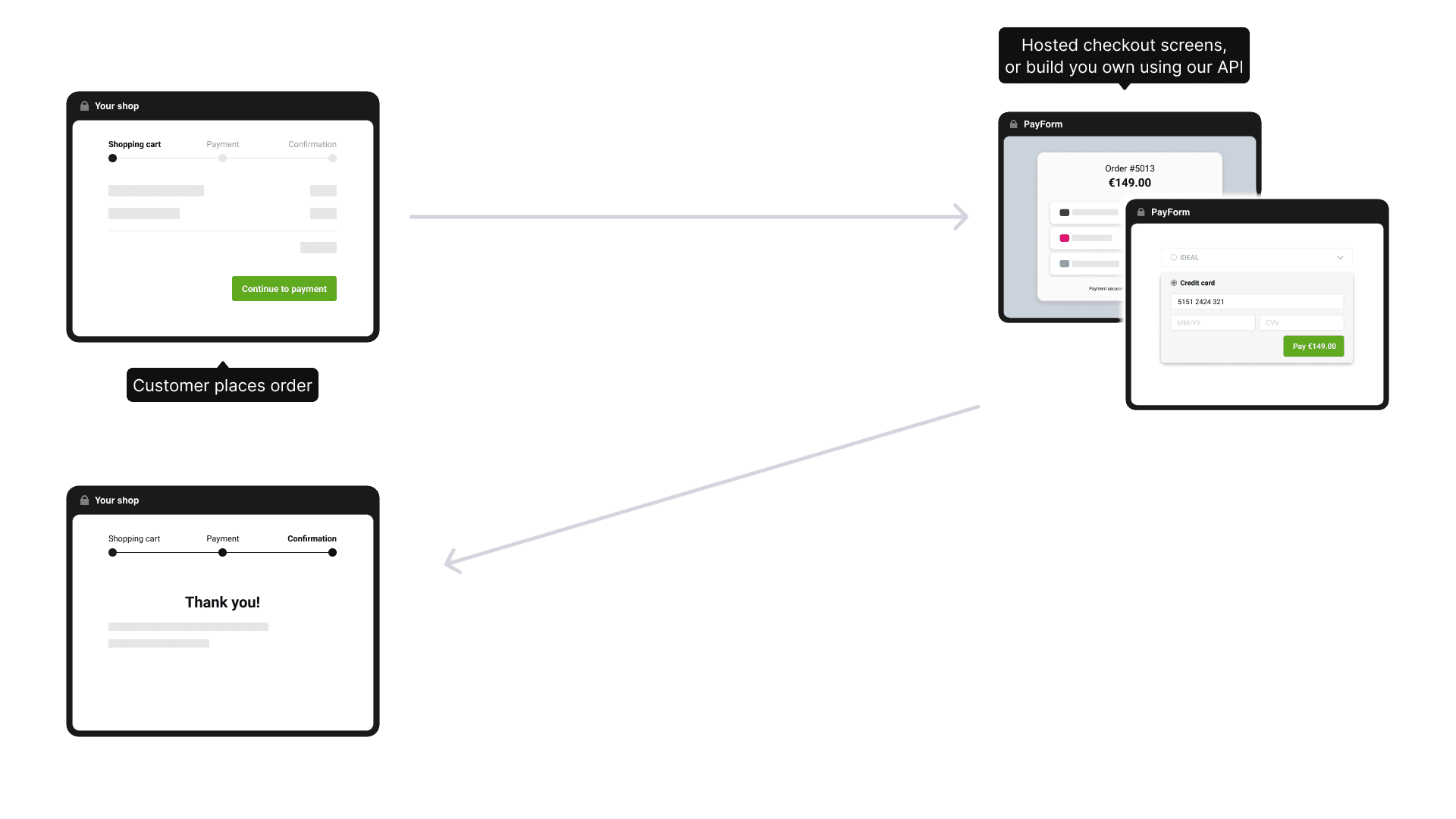 Figure 1 – What the shopper sees.
The diagram below shows the entire life-cycle of a payment, from the moment the shopper clicks Pay to the instant you update the order in your back-office.
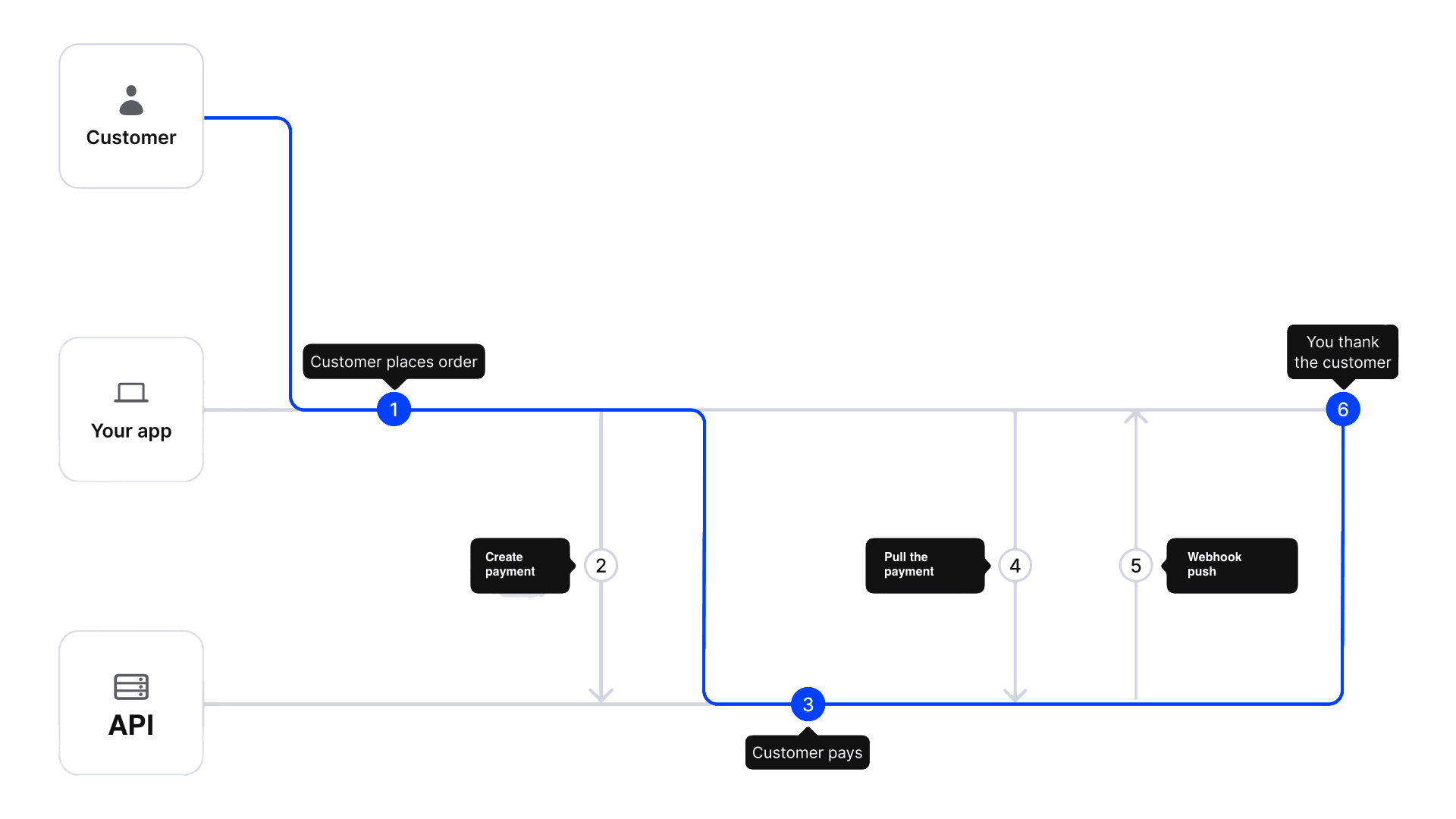 Figure 2 – Server interactions (numbers match the steps above).
- Checkout started
The shopper presses Pay now on your site. - Create payment
Your back-end callsPOST /api/paymentswith the amount and currency. And get the PayFormurl - Hosted PayForm
You redirect the shopper to the PayForm; the shopper selects a pay method and completes the payment. - Poll if you wish
You can retrieve the payment withGET /api/payments/:idto see whether it ispending,succeededorfailed. - Webhook push
As soon as the status becomes final we POST a webhook to the URL you supplied, signed with the token for verification. - Return to your site
We redirect the shopper back to yourredirectUrl, carrying the payment ID so you can show a receipt or an error page.
With just one API call and one webhook you have everything you need to confirm the payment, fulfil the order and give the shopper a seamless experience.
Payments API
The Payments API lets you charge users in web or mobile apps. Follow the steps below and you’ll have your first payment up and running in minutes.
Preparation
- Get a token in the Merchant Dashboard. Keep it on your server — never expose it in frontend code.
- Call every endpoint over HTTPS and add the header
Authorization: Bearer <your-token> - (Optional) Add an Idempotency-Key header with a UUID v4. It protects you from double charges if you resend the same request. If you omit the header, the platform will generate a key for you.
Step 1 — Create a payment
Endpoint
POST /api/payments
Content-Type: application/json
Required body fields
| Field | Type | Example | Description |
|---|---|---|---|
amount | string, decimal | "10.00" | Use a dot as the decimal separator. |
currency | string, ISO 4217 | "EUR" | Three capital letters. |
type | string | "payin" | payin or payout depending on the type of payment. |
Optional body fields
| Field | Type | Purpose |
|---|---|---|
description | string, max 255 chars | Shown to the shopper and in your dashboard. |
customer | object, max 4KB | { "id": "cust_42" (required, max 50 chars), "name": "Jo" (required, max 100 chars), "email": "jon@ex.com" (max 100 chars), "phone": "+4912345" (max 20 chars) }. Additional fields are allowed. |
metadata | object, max 4KB | Any JSON object (max 4KB when serialized). Arrays and null values are not allowed in the root. |
externalId | string, max 255 chars | Your unique identifier for this payment. Useful for mapping our payment ID to your internal ID. |
redirectUrl | URL, max 2KB | Overrides where to return the shopper after checkout. Must be HTTPS. |
webhookUrl | URL, max 2KB | Overrides the default webhook just for this payment. Must be HTTPS. |
formOptions | object, max 4KB | Overrides the default form settings for this payment only. Used to limit the user's payment method choices. Must be an object. Example: "formOptions": { "lang": "en", "methods": ["yape-pen-p2p", "card-usd-p2p"], "navigation": false } |
state | object, max 4KB | Overrides the default state and is used to select a payment method for the user. Must be an object: state: { "view": "selectPaymentMethod", "method": "payment method name" } |
cURL example
curl -X POST https://example.com/api/payments \
  -H "Authorization: Bearer tk_test_n4912345faza90aefk4c3awf" \
  -H "Idempotency-Key: 3e3f3796-4c3a-41e2-a90a-2c0f3e20b0a1" \
  -H "Content-Type: application/json" \
  -d '{
        "externalId": "3e3f3796-4c3a-41e2-a90a-2c0f3e20b0a1",
        "amount": "10.00",
        "currency": "EUR",
        "type": "payin",
        "description": "Order #1456",
        "customer": { "id": "550e8400-e29b-41d4-a716-446655440000", "name": "Customer Name" },
        "metadata": { "orderId": 1456 }
      }'
Response 201 Created / 200 OK
{
  "id": "pay_a1b2c3d4",
  "status": "pending",
  "url": "https://example.com/checkout/pay_a1b2c3d4",
  "externalId": "3e3f3796-4c3a-41e2-a90a-2c0f3e20b0a1",
  "amount": "10.00",
  "currency": "EUR",
  "type": "payin",
  "description": "Order #1456",
  "metadata": { "orderId": 1456 },
  "createdAt": "2025-05-27T14:25:00Z",
  "updatedAt": "2025-05-27T14:25:00Z",
  "expiresAt": "2025-05-27T14:25:00Z"
}
Fields not echoed back: redirectUrl, customer, webhookUrl.
Overrides the default state
You can manually set the initial state of a payment. This can be useful in two situations:
-
Preselecting a payment method If you already know which payment method should be used, you can set the required state immediately, skipping the standard method-selection flow.
-
Creating without user interaction The recipient details have already been collected. The client requests the payment instructions (where the funds should be sent).
Below is a detailed explanation of each scenario.
Creating a payment without user interaction
⚠️ Important: The state object supports the following fields: method, name, phone, account, bank, card. You should provide only the fields required by the selected payment method.
Then provide a state object, for example for yape-pen-p2p:
{
  "state": {
    "method": "yape-pen-p2p",
    "name": "JOHN TEST",
    "phone": "+573001112233"
  }
}
In the method field, you should pass the internal name of the payment method, for example card-usd-p2p, yape-pen-p2p, etc.
Full request example:
curl -X POST 'https://example.com/api/payments' \
  -H "Authorization: Bearer tk_test_n4912345faza90aefk4c3awf" \
  -H "Content-Type: application/json" \
  -d '{
      "amount": "10",
      "currency": "PEN",
      "type": "payin",
      "state": {
        "method": "yape-pen-p2p",
        "name": "JOHN TEST"
      }
    }'
If all validations are successful, the method is active, and the provided details are valid, you will receive a response like this:
{
  "id": "pay_4dc6dec2-1684-41dd-b99e-d330200e132b",
  "externalId": null,
  "amount": "10",
  "currency": "PEN",
  "status": "pending",
  "state": {
    "name": "JOHN TEST",
    "view": "waitingForP2PTransactionAndConfirmation",
    "isP2P": true,
    "method": "yape-pen-p2p"
  },
  "formOptions": {
    "lang": "es",
    "methods": [
      "nequi-p2p",
      "transfiya-p2p",
      "daviplata-p2p",
      "nequi-bre-b-p2p",
      "qr-pen-p2p",
      "plin-p2p",
      "viabcp-p2p",
      "interbank-p2p",
      "bank2bank-pe-p2p",
      "yape-pen-p2p",
      "yape-bob-p2p",
      "qr-bob-p2p",
      "card-usd-p2p",
      "phone2phone-usd-p2p"
    ],
    "navigation": false,
  },
  "type": "payin",
  "url": "http://example.com/checkout/pay_4dc6dec2-1684-41dd-b99e-d330200e132b?lang=es&methods=nequi-p2p%2Ctransfiya-p2p%2Cdaviplata-p2p%2Cplin-p2p%2Cviabcp-p2p%2Cinterbank-p2p%2Cbank2bank-pe-p2p%2Cyape-pen-p2p%2Cyape-bob-p2p%2Cqr-bob-p2p%2Ccard-usd-p2p%2Cphone2phone-usd-p2p&navigation=false",
  "description": "",
  "metadata": null
}
⚠️ NOTE: Unlike the next scenario, if any validation fails in this flow, the payout will not be created at all.
Preselecting a payment method
When creating a payout, you have the option to pass a state object like this:
{
  "state": {
    "view": "selectPaymentMethod",
    "method": "yape-pen-p2p"
  }
}
In the method field, you should pass the internal name of the payment method, for example card-usd-p2p, yape-pen-p2p, etc.
The view field must always be set to "view": "selectPaymentMethod".
In this case, the user will immediately see the form for entering the transfer details.
⚠️ Important: if the specified payment method is not supported by your organization, is invalid, does not support the payment currency, or the staff organizations do not have payment details for it, the payout will be created with the default state:
{
  "state": {
    "view": "selectPaymentMethod",
    "method": null
  }
}
Additionally, you can pass formOptions for the payment so that on the payment method selection step, the user only sees and can choose the methods you want. Example of a valid full JSON request body:
{
  "amount": "10",
  "currency": "PEN",
  "type": "payin",
  "description": "Test Payment",
  "state": {
    "view": "selectPaymentMethod",
    "method": "yape-pen-p2p"
  },
  "formOptions": {
    "navigation": false,
    "methods": ["yape-pen-p2p"],
    "lang": "es"
  }
}
What next?
- Open
urlin the browser or WebView — the user sees the hosted checkout page. - After payment we redirect the user to your
redirectUrl(if you sent it) with the following query parameters:paymentIdandstatus(succeeded/failed). Example:https://your-site.com/return?paymentId=pay_a1b2c3d4&status=succeeded. - We send a webhook with the final status (
succeeded/failed). - Repeat the same JSON with the same or no
Idempotency-Key: you’ll always get the same response, never a duplicate charge.
That’s it — two required fields, one optional header, and you’re ready to take money online.
Payment Limits
Each payment method has minimum and maximum allowed amounts. These limits depend on the method and currency and should be respected when creating payments.
How to get limits
You can retrieve available payment methods and their limits using the following endpoint:
| Endpoint | Description |
|---|---|
GET /api/views | Get payment methods and UI views (for payments) |
The response contains several objects, including: views, methods, currencies.
To determine the allowed limits for payments, you should inspect the methods object.
Method fields
Each payment method contains the following limit fields:
minAmount— Minimum amount allowed for the payment methodmaxAmount— Maximum amount allowed for the payment method
Example structure:
{
  "methods": [
    {
      "name": "yape-pen-p2p",
      "currency": "PEN",
      "minAmount": 1000,
      "maxAmount": 500000
    }
  ]
}
You should configure these limits in your system to ensure that the payment amount is valid before creating the payment.
If the payment amount is outside the allowed range, the API will return a error.
Example when the amount is less than the minimum allowed:
{
  "details": "Errors.paymentAmountIsLessThanMinAmount",
  "errorId": "err_5efc05b6868e425dbdeb432617c7684d",
  "timestamp": "2026-03-11T05:52:47.802Z",
  "variables": {
    "minAmount": 1000,
    "currentAmount": 100
  }
}
In this case:
minAmount— minimum allowed amount for the selected payment methodcurrentAmount— the amount provided in the request
If the amount exceeds the allowed maximum, a similar validation error will be returned with the corresponding limit information.
Recommendation:
- Retrieve available payment methods using GET /api/views.
- Store minAmount and maxAmount for the methods you support.
- Validate the payment amount on your side before calling POST /api/payments.
Response with error
All API errors share the same JSON shape. Clients can rely on it for parsing, logging, and user messages.
Object shape
- type — short machine-readable code. Examples: validationerror, authenticationerror, notfound, servererror.
- details — first error translation key (for i18n). Keys live under i18n/messages.
- errorId — unique ID (UUID v4). Show this to users and use it to find logs.
- timestamp — ISO 8601 UTC timestamp of when the error occurred.
- fieldErrors — optional. For validation errors only. Map of field → array of i18n keys.
- variables — optional. For validation errors only. Key–value pairs injected into i18n templates.
Behavior and conventions
- Always include: type, details, errorId, timestamp.
- Use fieldErrors and variables only for type = validation_error.
- details should be the primary (first) translation key for the error. For validation_error, it typically mirrors the most important field error.
- timestamps must be UTC in ISO 8601 (e.g., 2025-05-27T14:26:12Z).
- Never leak sensitive data in details or variables—only keys and safe values.
Validation error (single field)
{
  "type": "validation_error",
  "details": "Errors.validation.language.notSupported",
  "errorId": "e2af9e0e-7d51-4e3f-a90c-37c3fdf4dcd2",
  "timestamp": "2025-05-27T14:26:12Z",
  "fieldErrors": {
    "language": ["Errors.validation.language.notSupported"]
  },
  "variables": {
    "supportedLocales": "en-US, ru-RU, es-ES"
  }
}
Validation error (multiple fields)
{
  "type": "validation_error",
  "details": "Errors.validation.metadata.maxSizeBytes",
  "errorId": "b12345cd-6789-4ef0-8abc-1234567890ab",
  "timestamp": "2025-05-27T15:00:00Z",
  "fieldErrors": {
    "metadata": ["Errors.validation.metadata.maxSizeBytes"],
    "customer": ["Errors.validation.customer.id.required"]
  },
  "variables": {
    "maxSizeBytes": "4096"
  }
}
Notes for translators
- Keys live in i18n/messages.
- variables provides placeholders for messages (e.g., {maxSizeBytes}).
- Keep messages short and actionable; avoid exposing internal codes to end users.
Below are typical failure cases you might hit while creating a payment.
| HTTP code | type | When it happens | Example details |
|---|---|---|---|
| 400 | validation_error | Required field is missing or fails validation | Errors.validation.amount.required |
| 401 | unauthorized | No Authorization header, wrong token, or token expired | Errors.invalidToken |
| 409 | idempotency_conflict | Same Idempotency-Key, but body is different from the first try | Errors.payloadDiffersFromOriginalRequest |
| 409 | conflict | Same externalId | Errors.externalIdAlreadyInUse |
| 429 | rate_limit | Too many requests per minute | Errors.toManyRequests |
| 500 | internal | Any unexpected error on our side | Errors.generic |
Example:
HTTP/1.1 400 Bad Request
Content-Type: application/json

{
  "type": "validation_error",
  "details": "Errors.validation.amount.required",
  "errorId": "8250c4ef-1d6e-4083-b4b7-35e968c8bc85",
  "timestamp": "2025-05-27T14:26:12Z",
  "fieldErrors": {
    "amount": ["Errors.validation.amount.required"]
  },
}
Use the errorId when contacting support—this lets us find the exact log entry in seconds.
Step 2 — Get the result
When the shopper finishes checkout you need the final status of the payment. Choose one (or use both for extra safety).
| Option | When to use | Latency | Pro | Con |
|---|---|---|---|---|
| Webhook (push) | Your server is publicly reachable | Seconds | Instant; no polling overhead | You must handle retries & verify the call |
| GET /api/payments/:id (pull) | Fire-and-forget back-end jobs, or if webhooks are blocked by firewalls | On demand | No inbound traffic required | You decide when to poll; too often → rate-limit |
Handle the webhook (recommended)
- Configure a default webhook URL in the Merchant Dashboard (or pass
webhookUrlwhen you create a payment). - We make an HTTPS
POSTwithContent-Type: application/json:{ "id": "pay_a1b2c3d4", "status": "succeeded", // or "failed" "amount": "10.00", "currency": "EUR", "type": "payin", // or "payout" "createdAt": "2025-05-27T14:25:00Z", "description": "Order #1456", "externalId": "3e3f3796-4c3a-41e2-a90a-2c0f3e20b0a1", "updatedAt": "2025-05-27T14:26:18Z", "metadata": { "orderId": 1456 } } - Return
2xxwithin 10 s to stop retries. - (Optional but strongly advised) Verify the signature in the
X-Signatureheader with your secret key. - Update your order, send e-mail receipts, ship the goods—whatever “done” means in your system.
Retry logic We retry with exponential back-off for up to 48 h until we get a 2xx. Each retry carries the same body and the same Idempotency-Key, so you can safely re-process if you treat the key as unique.
Retrieve the payment
GET /api/payments/:id
Authorization: Bearer <your-token>
Curl example:
curl https://example.com/api/payments/pay_a1b2c3d4 \
  -H "Authorization: Bearer sk_live_yourToken"
Response 200 OK:
{
  "id":        "pay_a1b2c3d4",
  "status":    "succeeded",      // pending → succeeded / failed
  "amount":    "10.00",
  "currency":  "EUR",
  "type":       "payin",
  "description": "Order #1456",
  "metadata":  { "orderId": 1456 },
  "createdAt": "2025-05-27T14:25:00Z",
  "updatedAt": "2025-05-27T14:26:18Z"
}
status | Meaning | Next step |
|---|---|---|
pending | Shopper is still in checkout | Wait or poll again |
succeeded | Money captured or authorised | Fulfil the order |
failed | Payment declined or expired | Show error, let the shopper retry |
Combine both methods: accept webhooks for real-time updates, and poll as a fallback if you never hear back after, say, 5 minutes.
That’s it — listen for one webhook or make one GET call, and you’ll always know exactly when the cash is in the bank (or not).
Other sections
- Payout - more information about payout
- Payform - more information about custom payment chechout page
- Payoutform - more information about custom payout checkin page